Security
Built on the assumption that the model will be fooled.
shift assumes any run can be manipulated, by a log line, a ticket or a tool's answer. So the model never decides what it may do. Permissions around it do, checked on every call and recorded.
shift holds no certification. This page shows how it works instead, so your security team can judge it for itself.
-
server_enabled -
tool_approved -
grant_held -
client_allowed -
on_allowlist -
authorize_mode -
within_limits -
credential_usable
Denied. Nothing was sent.
01
One gate for every call
Every tool call passes one module, the Tool Guard: the chat's, an agent's, a widget's refresh, and calls from outside clients. Its checks are a list of named functions. The first that fails stops the call. Nothing is allowed unless a check path allows it.
-
server_enabledThe server is switched on.
-
tool_approvedAn admin approved the tool, and its definition hasn't changed since.
-
grant_heldThe person, or the agent's owner, holds a grant right now.
-
client_allowedFor an outside client: the deployment and an admin allow this tool.
-
on_allowlistFor an agent: the tool is on its version's list.
-
authorize_modeThe tier decides: run, ask for approval, or refuse.
-
within_limitsThe run still has tokens and calls left.
-
credential_usableThe account the call would use is there and valid.
-
None failed: the call runs, or waits for approval.
For a denied call, an admin can ask why. shift checks the call as a chat call against today's servers, tools and grants and shows which check stops it.
A check in the build lets the application's code reach MCP servers, model providers and the web only through a few designated modules, so a new way out can't slip past review.
02
A person approves the exact call
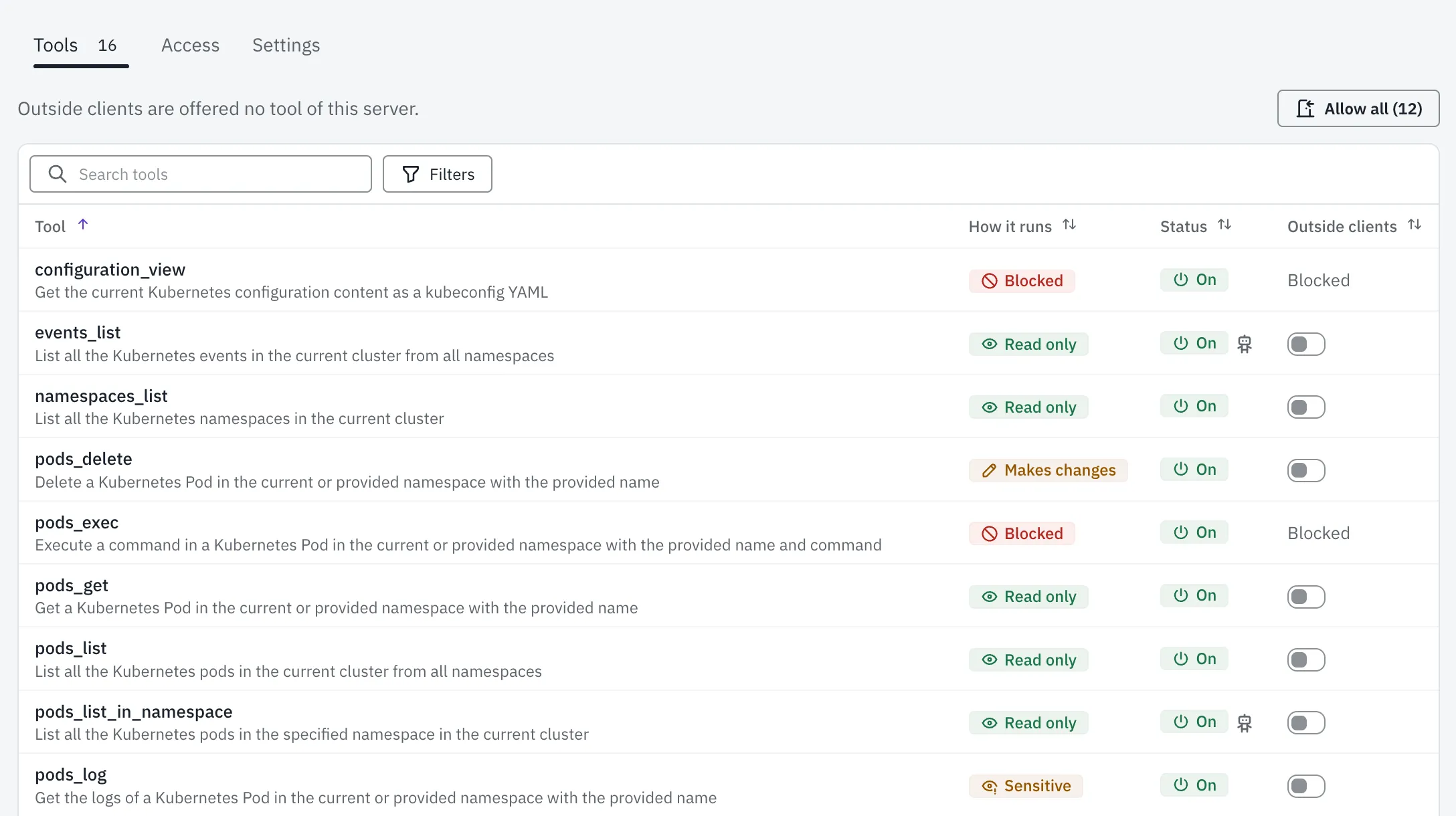
An admin reviews every tool of a server before anyone can use it, and gives it one of four tiers. Read-only tools run. Sensitive tools, which reveal private data, and tools that make changes wait for approval each time. Blocked tools are never offered to the model.
| Tier | What it's for | With a person | Agent, unattended |
|---|---|---|---|
| Read only | Tools that cannot change anything | Runs | Runs |
| Sensitive | Tools that reveal private data | Waits for approval of the exact call | Runs only if an admin flagged the tool and it is in the version the owner activated; otherwise waits for approval |
| Makes changes | Tools that change something | Waits for approval of the exact call | Runs only if an admin flagged the tool and it is in the version the owner activated; otherwise waits for approval |
| Blocked | Tools the assistant must never get | Never offered | Never offered |
The approval shows the exact arguments, at full length, with hidden format characters written out. You approve that call, once. Only the person the call runs for can approve it; admins may deny or cancel it. An approval expires after an hour in chat and after 24 hours for agents, and an expired approval counts as a denial.
A call waits for your approval.
pods_log Kubernetes Sensitive
Exact arguments
{
  "namespace": "shift-demo",
  "name": "podinfo-6b7f9d8c4-x2kqp",
  "previous": true
}
Asked in your chat · expires in 1 hour Only the person a call runs for can approve it.
Agents that run alone may use a Sensitive or Makes-changes tool without asking only if an admin flagged that tool for unattended use and the tool is in the version the owner activated. The flag is off by default, and a changed tool turns it off again.
Approving a tool pins its definition: name, description, schemas and annotations. If the server changes any of it, the tool closes until an admin reviews it again, and agents that use it pause until their owner activates them again.
03
No change runs twice
Every call is written to a ledger, keyed by its run and call id, before it is sent. If shift crashes after a call ran but before it stored the result, the ledger keeps a call that may change something from running a second time; a Read-only call simply runs again. When the outcome of a call that changes something is unknown, the model is told “outcome unknown, do not retry” and the audit log flags it.
Each run has a token budget and a limit on tool calls. Denied calls count against it, so a model that keeps trying runs out.
04
Every step on the record
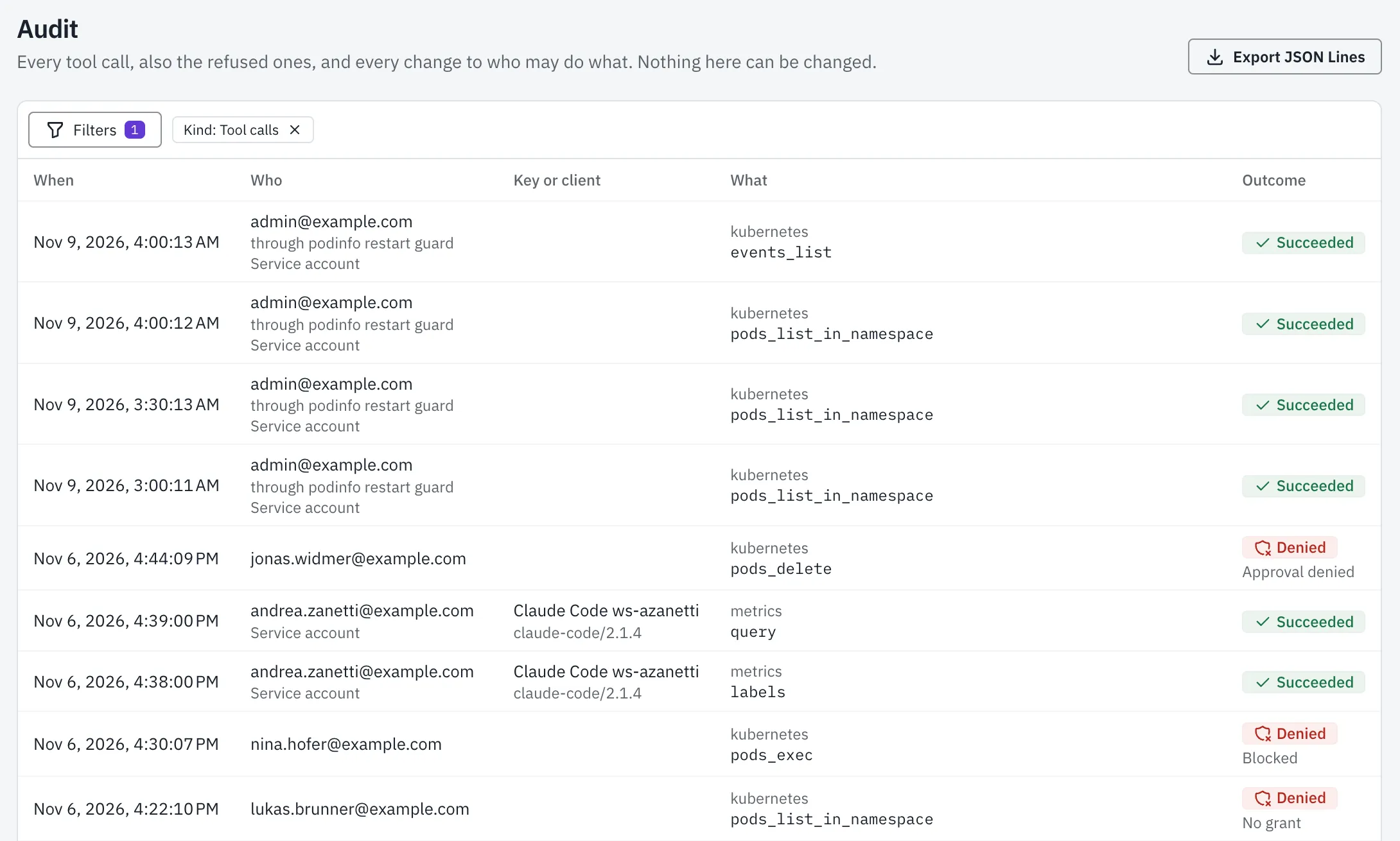
Every tool call, including denied ones, every approval and every admin change lands in one append-only log. A call's entry names who approved it, the identity it ran as, the tool's definition hash and its arguments, with secrets redacted by key name.
Admin changes, such as grants, tiers, roles, servers, keys and shortcuts, are recorded in the same database transaction as the change itself. A change is recorded, or it did not happen.
A database trigger refuses UPDATE, DELETE and TRUNCATE on the log. Export it as JSON Lines for your SIEM or your auditor.
How a call can end
- Succeeded The server answered.
- Failed The call was sent, and the server reported that it failed.
- Denied The Tool Guard refused the call. Nothing was sent.
- Simulated A preview stubbed the call. Nothing was sent.
- Unknown The result is not known: the call may have run.
05
Your identity provider decides who comes in
shift signs people in with OpenID Connect (ID-token claims only, PKCE, state and nonce, a verified e-mail address on every sign-in) or with magic links. An SSO-only mode turns magic links off. SCIM 2.0 provisioning pushes users and groups, so someone removed at the identity provider loses access within minutes.
There are two roles: admins manage servers, tools, groups and people; users chat, connect their accounts and own agents. A role alone gives no tool: an admin needs a grant too. Conversations are private to their owner, also from admins. Admins have the audit log.
Tested live with pocket-id and Dex. With Microsoft Entra, SCIM works in part.
06
Your own AI client, under the same rules
shift is also an MCP server at /mcp, for a person's own client such as Claude Code. It is off until an admin turns it on, and then each tool is off until an admin allows it. Only Read-only tools are offered; a call that would need an approval is refused. Clients sign in with OAuth, with tokens valid for ten minutes, or with a personal key for headless use. Every call is audited with the client's name and address.
07
Secrets stay where they belong
Model provider keys and shared server credentials are encrypted at rest with AES-GCM. Options that hold a key are never stored with a job. Log lines carry ids, counts, durations and error classes, never secrets or personal data.
In the browser, a strict content security policy with a fresh nonce per request, no images from model output, and links only to shift and the servers in use, so a crafted answer cannot send data out through an image.
08
Private addresses only by name
An MCP server on a private address needs an admin to name the exact host and its address ranges: no wider than /8, no link-local, no cloud metadata addresses. A server's address can't be changed later, so stored credentials never travel to a new one. Every MCP tool call lands in the audit log, and requests to your identity provider are logged, with credential-like values filtered.
09
One image, on your infrastructure
shift ships as one container image with a Helm chart, one deployment per customer, single tenant. It runs as a non-root user on a read-only root filesystem. The chart turns on a NetworkPolicy by default, and secrets come from an existing Kubernetes Secret or External Secrets, never from chart values.
Replies and agent runs are database-backed jobs. They survive a restart.
We tested the job, tool loop, Tool Guard, ledger and audit against a scripted attacker: a fake model that made a scripted set of forbidden calls. The Tool Guard denied each of them.
10
Found a problem?
Write to us. We answer from Bern. hello@zebbra.ch